Always check out the original article at http://www.oraclequirks.com for latest comments, fixes and updates.I like jokes as you can understand from the title of this posting, however i was in the mood for it because sometimes i happen to read FAQ lists where there are questions that i'd never ask in centuries, hence the idea of a SAQ list.
Apex globalization mechanism is extremely powerful and flexible, yet you need to know what you are doing if you don't like last minute surprises. In other words you need to master the globalization process if you don't want to accidentally delete translated text or put in jeopardy the whole application with a wrong action.
Before delving into the list of questions, let's take a tour of the main translation page of Oracle Application Express.
The Apex globalization process is managed from the page below, that you can easily access from the shared components page of the application builder:
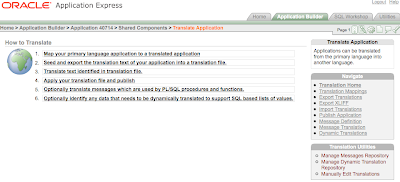
The central region of this page outlines the steps from the beginning to the end of the globalization process and provides the links to the key phases of the process.
Step 1 in this list is a one-off task that needs to be performed only when:
- you need to create a new translated application
- you need to change an existing mapping or delete it altogether.
Step 2 is the real starting point each time you need to update an existing application when you've changed something that needs to be propagated to the various translations.
Step 3 is a curious fake link. Indeed it's just a reminder of what you need to do next, that is either translate the text yourself or ask someone else to do it for you.
Step 4 takes you to the page where you can see the list of XLIFF files loaded in the repository and you can apply one of them or you upload a freshly translated one.
Step 5 points to the page where you manage the static message translations and is optional. If you don't use translatable text messages, those retrieved via the API call to
APEX_LANG.MESSAGE you don't need to go there. Translatable messages are extremely useful for translating static text that needs to be stored inside page items or application items or when the value needs to be returned through a PL/SQL function in the current language.
See the linked page for a practical example.
Step 6 leads you to an even more sophisticated feature, the dynamic translation of text returned by dynamic LOVs, that is list of values based on queries. While text descriptions coming from static LOVs are automatically retrieved by Apex and inserted into the repository, this is not possible with dynamic LOVs that are based on user defined queries on arbitrary tables, however Apex gives you the possibility of performing dynamic translations, so, if you have a query like:
SELECT fruit_name d, fruit_id r
FROM fruits
you can get "apple" when viewing the page in English or "Apfel" when viewing it in German.
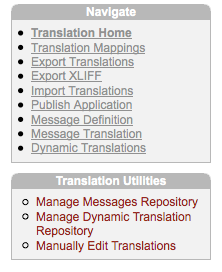
The menu called
Navigate on the right hand side is a fine grained list of tasks and gives you instant access to the critical features.
The menu below it, called
Translation Utilities, is also important because it's the only place where you find a link to the page for
manually translating the text.
For some reason the link to the page that you'll visit most frequently has been named
Export Translations, followed by the link
Export XLIFF, which is the real page where you actually download a dump of the translation repository.
Why do i need to map an application?Apex globalization mechanism works by creating a sort of ghost application with its own
application ID.
Mapping means assigning a number to a translated application. In an hosted environment like
apex.oracle.com, where there are thousands of application IDs already taken by other users, it can be tricky to find out a free application ID because Apex does not automatically suggest the next available number.
Note that Apex doesn't actually reserve the application ID until you publish the translation, so it might happen that you choose an ID but then it's also taken by another user before you had the time to publish the translation.
If that happens, you'll get a run-time error when you attempt to publish (but not at time of seeding):
ORA-20001: Error during execution of wwv_flow_copy: WWV_FLOWS
ORA-00001: unique constraint (FLOWS_030100.WWV_FLOW_FLOW_PK) violated
Each application ID maps to a language code, like
it,
fr,
de,
zh-cn,
ja and so on.
Apex maintains a consistent session state whenever you switch from one language to another by any means, within the same apex session, which is a good thing.
1. What does it mean to seed an application?Seeding is the process of preparing a translated version of your primary application.
When you seed the text, Apex inserts/updates/deletes the translation repository with the most recent version of the translatable strings. Seeding alone does not change anything in the currently running translated applications until you
publish the translated version.
Note also that when you seed an application you are doing a twofold action: you are not only updating the source text but also the target text. An important thing to bear in mind is that the target text won't be touched only if the old source text and the new source text are
equal, (which means that a single space makes a difference!), otherwise it will be "reset". See later on for a typical scenario.
2. What happens when i publish an application?Publishing is the final step in the globalization process.
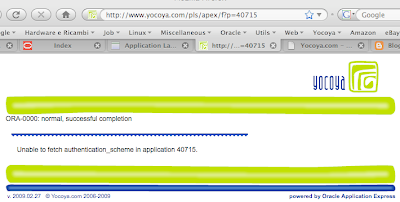
The application is created by assembling the metadata from the primary application and merging it with the translated text. Note that you cannot access directly a translated application by invoking Apex with the mapped application ID, if you attempt to do so, you'll get a page like this:
 3. What if i need to update only a few new translated strings?
whenever you add a new element which is a candidate for a translation, like a page item or a new shared component like a list entry, translated applications won't pick them up until you
seed the application to the desired language. After seeding the application, the fastest way to get a string translated is to
manually edit it. After editing the translation, you can go straight to the publishing phase, without importing anything.
- seed the application
- click on translation home
- click on manually edit translations
- update the translations
- export the XLIFF file for future reference ( this step is not required but highly recommended!)
- publish the selected translation
4. What if i need to update a few existing strings because i changed the corresponding source element?you must be careful when changing the text of a source element because Apex will automatically wipe out the translation upon seeding! Imagine you have a large text in the source language and you realize there is a grammatical error for instance. This grammatical error is probably absent in the target language(s) so you could easily have a situation where you want to change just the source element, not the existing translations.
So, you fix the source text, seed the application and bang, the old translation is lost!
The target element is erased and replaced with the new
untranslated text.
This example demonstrates why you ought to export a full XLIFF file whenever you translate something, the file will be the backup in case something goes wrong.
Back to our problem, if you change a translatable string of an existing element, if you seed the application again, then you need to recover the translation from the XLIFF file, if it still applies, or provide a new one if it does not apply or if you didn't export the XLIFF file. See entry #3 on how to manually edit a translation.
5. What is an XLIFF?XLIFF is an international file format standard based on XML tailored for translation tools. You can find out more on
XLIFF on wikipedia.
6. Do i necessarily need to translate the content of the XLIFF file to translate an application?No, you don't. You can manually edit the translations after seeding the translation. However, after doing so, you should immediately take an export in XLIFF format as a backup of your work!
The XLIFF format comes in handy if you are going to use some tool to translate the text, otherwise you can easily break the XML file format by deleting or inserting unwanted characters, especially if the translated text contains some HTML tags. There is a
free on-line tool kindly provided by iAdvise, that allows you to manipulate XLIFF files generated by Apex.
7. Is there any apex dictionary view containing the translations?At time of writing (version 3.1.2) there isn't any built-in apex dictionary view available and unless i overlooked it, there isn't any view in the just released
version 3.2.
8. Why when i query certain apex dictionary views like apex_application_pages columns like help_text or label are always returned in the primary language?The apex dictionary view doesn't currently support a language "context", so it always returns the text stored in the primary application, even when the query is originated from a translated application.
Hopefully one day apex dictionary views will fully support translated applications.
9. How can i compare two XLIFF files?There are some tools around to do this specifically on XML files, besides some powerful plain text editors or Unix and DOS commands.
Some years ago i bought a license of XMLSpy, a powerful Windows based XML editor that comes with a document comparison function. I used it just yesterday to understand why i got two different links in two different application translations. As far as i know you can install a trial of XMLSpy valid for 30 days, so if it is a one-off requirement, it won't cost you a penny.
Altova released also a stand-alone utility called diffDog for comparing files, so you might want to check it out as well.
As i am working more and more time on the Mac, today i searched for a file compare utility for Mac OS X and i found what it seems to me like a perfect match,
a multiplatform utility called DeltaWalker.
I quickly installed the trial and it worked like a charm although i didn't perform any "stress test". Even in this case you have days ahead to evaluate the product before buying a license.
This was not meant to be a comprehensive software review, so you may want to conduct a deeper search on the web.
10. The Application Language Derived From attribute (in the Globalization Attributes page) contains several options, two of them are called Application Preference and Item Preference: what's the difference between the two?The former option automatically retrieves the language from a user preference, supposing you have some process that calls the API procedure
APEX_UTIL.SET_PREFERENCE. The preference name is called
FSP_LANGUAGE_PREFERENCE, a name that may easily lead to some confusion with the other option.
This approach makes sense when the application requires authentication because it stores the value in a sort of user profile. The advantage is in that a
returning user doesn't need to switch the language after the login, it will be automatically set by Apex (but he/she can still change it at any time afterwards).
The latter option works by storing the language option inside an application item called
FSP_LANGUAGE_PREFERENCE (
that you need to create yourself, don't forget it), so the user might have to change it every time if the primary language is not the preferred one. The advantage of this approach is in that it works also with public pages, where you can pick a specific language by clicking on an icon or selecting from a list. The logic for updating the application item must be written by the developer.
11. Is there any way to set a given language from the URL?This problem has haunted me for quite some time.
The solution i found works well with real users but doesn't work well with web spiders like googlebot who is very picky with web redirects.
First of all you need to set the globalization attribute
"Application Language Derived From" to
"Item Preference (use item containing preference)".
Secondly you must set up an application process that runs before header performing a conditional redirect using the following PL/SQL call:
begin
:FSP_LANGUAGE_PREFERENCE := :REQUEST;
htp.init;
owa_util.redirect_url('f?p='||:APP_ID||':'||:APP_PAGE_ID||':'||:APP_SESSION);
end;
and the condition is
"Request is contained within Expression1", where expression1 contains the list of the expected language codes like
"en,de,fr,..." as shown in this sample page:
http://apex.oracle.com/pls/otn/f?p=multilangdemo:1:0:enhttp://apex.oracle.com/pls/otn/f?p=multilangdemo:1:0:esAs i stated initially, redirecting the page may adversely affect the page indexing process, for instance Google spiders don't like at all redirects and this may prevent the link from being harvested. This is not a problem if the application is not aimed to the public and you don't expect users to reach you through a web search.
Note that setting the item
FSP_LANGUAGE_PREFERENCE directly from the browser achieves curious results owing to the sequence of operations that Apex does when building a page. If you set this application item from an URL, apex will start building the page using the current language, then, at a certain point it will set the new value for the variable in the session state. This may result in pages with mixed languages, where static text is still in the old language and dynamic content is in the new language. If you reload the page though, the new language will be used. This is clearly a suboptimal solution.
There must be a reason if the Apex team decided to retrieve the current page language before setting values in session state, if not, may be one day we will be able to change the current language before the page loads without the need for an additional redirect.
Updated on march 13: i simplified the argument in the call to
OWA_UTIL.REDIRECT_URL, instead of using an absolute path, now i'm using a relative path, which makes the transition from a development or test environment to a production environment much easier because there is no need to worry about the current service path.
12. How to show the current page in a different language by pressing a button?With a logic similar to that i explained in question #11, but replacing the redirect process with an
application computation that updates the value of
FSP_LANGUAGE_PREFERENCE after submitting the page, you can switch language in every page of your application by clicking on a button defined as illustrated below:
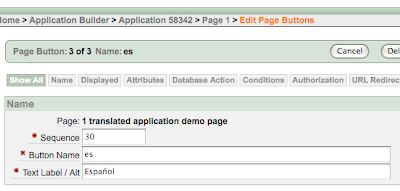
The second component is a simple
conditional after submit application computation (a computation that will automatically run on each and every page if a condition is met) defined as follows:
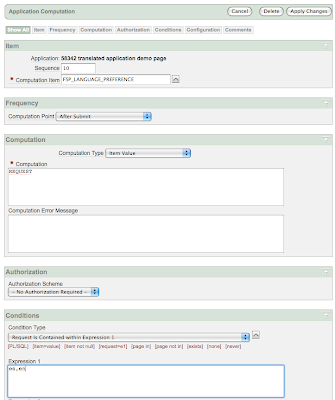
With just a few components like a region of buttons (or icons or whatever you prefer) defined on page zero and a single application computation, you can easily enable language switching on each page. If you prefer you can move this function to the navigation bar, where you can define each entry as an URL containing a javascript call like
"javascript:doSubmit('es');".
See how it works in a
live demo application.
More
infrequently asked questions to be added in the future.
See more articles about
Oracle Application Express or
download tools and utilities.


