Showing posts with label Translation. Show all posts

Thursday, November 14, 2024

APEX tip of the day: translate tooltip when TITLE = "some text" is added to the link attributes of a IR report column

The "link attributes" of an interactive report allows a developer to specify additional attributes for a column displayed as a link in a interactive report.

A tooltip that will be displayed when a user hovers over the link text with the pointer can be specified using the attribute TITLE, for instance: TITLE="open page xyz".

This column attribute however is not picked up by the translation process of APEX, so it's not something that can be be found in the translation repository.

An easy way to work around the problem if you need to translate the text is as follows:

  1. add a new column to the IR report containing:
    APEX_LANG.MESSAGE('MSGOPENXYZ') as MSG1
  2. Make the column hidden.
  3. Update the LINK ATTRIBUTES column attribute adding TITLE="#MSG1#"
  4. Add the message MSGOPENXYZ to the message repository for the main language and for the additional languages.
  5. Repeat the steps 1-4 if you have more links needing this.
  6. Seed you application
  7. Publish the application in the additional languages
  8. Enjoy the translated tooltip.


Tuesday, October 31, 2023

Handling XLIFF documents generated by Oracle APEX

XLIFF files have been around since the first version of Oracle APEX as I remember.

Even if you are not interested in XLIFF files, you may find interesting the code below as I am showcasing the usage of many SQL/XML functions.

Recently I wanted to spare some time while translating some of these files, so I decided to brush up my Oracle XMLDB skills that have been put on hold in the last years owing to the increasing popularity of JSON.

The goal is to take a XLIFF file exported from an APEX application and turn it into relational data for easier handling, then take the data, presumably modified for some reason, and convert them back into a XLIFF file that can be applied to the original application.

This code was created on Oracle 19c.

-- XLIFF structure
/*
<?xml version="1.0" encoding="UTF-8"?>
<!-- 
  ****************** 
  ** Source     :  100
  ** Source Lang:  en
  ** Target     :  108
  ** Target Lang:  it
  ** Filename:     f100_108_en_it.xlf
  ** Generated By: TOOLS_WKS_ADMIN
  ** Date:         26-OCT-2023 15:55:30
  ****************** 
 -->
<xliff version="1.0">
<file original="f100_108_en_it.xlf" source-language="en" target-language="it" datatype="html">
<header></header>
<body>
<trans-unit id="S-5-1-100">
<source>Welcome</source>
<target>Benvenuto</target>
</trans-unit>
...
<trans-unit id="S-458-4595199304859029-100">
<source>Username</source>
<target>Nome utente</target>
</trans-unit>
</body>
</file>
</xliff>
*/


--------------------------------------------------------
--  DDL for Table XLIFF_EXPORT_FILES
--
--  This table holds the XLIFF documents stored as XMLType
--  Created by Byte64 2023/10/27
--------------------------------------------------------

  CREATE TABLE "XLIFF_EXPORT_FILES" 
( "ID" NUMBER(*,0) GENERATED ALWAYS AS IDENTITY ORDER NOT NULL,
"FILENAME" VARCHAR2(128) NOT NULL,
"DATE_INS" DATE DEFAULT SYSDATE,
"XLIFF" "XMLTYPE" NOT NULL,
CONSTRAINT "XLIFF_EXPORT_FILES_PK" PRIMARY KEY ("ID") USING INDEX ENABLE
);
-------------------------------------------------------- -- DDL for View V_XLIFF_RELATIONAL -- -- This view transforms XML into relational data -- Created by Byte64 2023/10/27 -------------------------------------------------------- CREATE OR REPLACE FORCE EDITIONABLE VIEW "V_XLIFF_RELATIONAL" ("ID", "ITEM_ID", "SOURCE_LANGUAGE", "TARGET_LANGUAGE", "TRANS_UNIT_ID", "SOURCE_TEXT", "TARGET_TEXT", "DATE_INS") AS
select x.id, rownum as item_id, tu.source_language, tu.target_language, t."TRANS_UNIT_ID",t."SOURCE_TEXT",t."TARGET_TEXT", x.date_ins
from xliff_export_files x,
xmltable('/xliff/file' passing x.xliff
columns
source_language varchar2(30) path '@source-language',
target_language varchar2(30) path '@target-language',
trans_unit xmltype path 'body/trans-unit'
) tu,
xmltable('/trans-unit' passing tu.trans_unit
columns
trans_unit_id varchar2(128) path '@id',
source_text varchar2(4000) path 'source',
target_text varchar2(4000) path 'target'
) t
; -------------------------------------------------------- -- DDL for Table XLIFF_RELATIONAL -- -- This table will contain the data extracted with -- view V_XLIFF_RELATIONAL -- Created by Byte64 2023/10/27 -------------------------------------------------------- CREATE TABLE "XLIFF_RELATIONAL"
( "ID" NUMBER(*,0) NOT NULL,
"ITEM_ID" NUMBER(*,0) NOT NULL,
"SOURCE_LANGUAGE" VARCHAR2(30) NOT NULL,
"TARGET_LANGUAGE" VARCHAR2(30) NOT NULL,
"TRANS_UNIT_ID" VARCHAR2(128) NOT NULL,
"SOURCE_TEXT" VARCHAR2(4000) NOT NULL,
"TARGET_TEXT" VARCHAR2(4000) NOT NULL,
"DATE_INS" DATE DEFAULT SYSDATE
); -------------------------------------------------------- -- DDL for View V_XLIFF_RELATIONAL_DATA -- -- This view ensures that the elements are pulled out in -- the same original order, which could make it easier -- to spot problems by comparing the original XLIFF -- with the new one -------------------------------------------------------- CREATE OR REPLACE FORCE EDITIONABLE VIEW "V_XLIFF_RELATIONAL_DATA" ("ID", "ITEM_ID", "SOURCE_LANGUAGE", "TARGET_LANGUAGE", "TRANS_UNIT_ID", "SOURCE_TEXT", "TARGET_TEXT", "DATE_INS") AS
select "ID","ITEM_ID","SOURCE_LANGUAGE","TARGET_LANGUAGE","TRANS_UNIT_ID","SOURCE_TEXT","TARGET_TEXT","DATE_INS"
from xliff_relational
order by id, item_id
; -------------------------------------------------------- -- DDL for View V_XLIFF_OUTPUT_FILES -- -- This view extracts the relational data as XLIFF files -- one BLOB for each ID -- Created by Byte64 2023/10/27 -------------------------------------------------------- CREATE OR REPLACE FORCE EDITIONABLE VIEW "V_XLIFF_OUTPUT_FILES" ("ID", "XLIFF") AS
select
id,
xmlserialize(document
xmlconcat(
xmlcomment('generated externally'),
xmlelement("xliff", xmlattributes('1.0' as "version"),
xmlelement("file", xmlattributes(f.filename as "original",
(select x1.source_language
from xliff_relational x1
where x1.id = f.id
fetch first 1 row only) as "source-language",
(select x1.target_language
from xliff_relational x1
where x1.id = f.id
fetch first 1 row only) as "target-language"
),
xmlelement("header", null),
xmlelement("body", (select xmlagg(
xmlelement("trans-unit", xmlattributes(x.trans_unit_id as "id"),
xmlforest(x.source_text as "source", x.target_text as "target")
)
) from v_xliff_relational_data x
where x.id = f.id
)
)
)
)
) as blob
encoding 'UTF-8'
version '1.0' -- this will generate the XML header automatically
indent size = 2 -- optional indentation for pretty-print
) as xliff
from xliff_export_files f
;

Workflow:

  1. seed the application translation;
  2. export the XLIFF file generated by APEX;
  3. load the XLIFF file into XLIFF_EXPORTED_FILES;
  4. populate XLIFF_RELATIONAL selecting from V_XLIFF_RELATIONAL with the ID created during the previous step;
  5. do some work on the data;
  6. download the resulting file querying V_XLIFF_OUTPUT_FILES by ID;
  7. load the translation back into the Apex Builder;
  8. apply the translation to the application;
  9. publish the application.

Steps 3-6 could be done with the help of a simple APEX application enabling people who are not allowed to work directly in the Application Builder to perform the translation work.

Besides the normal translation work, having the data in a custom table allows to:

  • leverage existing translations by matching the source text, especially in the case of simple strings like button names, item labels taking the translations from another application;
  • perform quality checks searching for similar text and make them consistent throughout the whole application, i.e. verify that buttons, item labels, region titles have a consistent format, and so on.
  • clone a language with minor linguistic variations starting from a complete translation, i.e. English (US) vs English (CA) or Spanish (ES) vs Spanish (MX) and so on.

The XLIFF file generated by the view V_XLIFF_OUTPUT_FILES are pretty printed with an indentation value of 2 spaces, this will cause the file to be somewhat larger than the original even if no change has been made to the target elements. The clause INDENT SIZE = 2 can be removed to keep the file size smaller.

Caveat emptor!

Friday, January 23, 2015

Apex multilingual applications and build options

Always check out the original article at http://www.oraclequirks.com for latest comments, fixes and updates.

Just a quick reminder for those who are devoloping Apex multilingual applications:

Build options' state is propagated to translated applications at the time of seeding, so you need to be careful when changing the state of a build option in the primary language because you may end up with translated applications having a different build option state.

For example, say you have a "production" build option attached to an application process whose goal is to run some PL/SQL code only if the application is deployed in the production environment.
Of course at some point during development you need to verify it it works so you turn on the build option (state = "include"). You seed and publish your mapped applications in order to verify if it works also when the user changes language. Then you turn off the build option (state="exclude") but you forget to seed and publish again the translated applications.
The result is you end up with a mixed situation with the primary application having "production" off and translated applications with "production" on (or viceversa) and you are probably starting to see some odd behaviour when you change language.
Even worse if you seed and publish a subset of translated applications, the situation may become really confusing.

The rule of thumb when you change a build option's state in a multilingual application is to always seed and publish immediately all translated applications for consistency.

At any rate, you can quickly assess build option states for all the translated applications by running the following query as the schema owner (or sysdba):


select application_id, build_option_name, build_option_status 
  from apex_application_build_options
 where application_id in (select b.translated_application_id 
                            from apex_application_trans_map b 
                           where b.primary_application_id = :APPLICATION_ID
                             and b.workspace = :WORKSPACE)
    or application_id = :APPLICATION_ID
 order by build_option_name, application_id;
 
 
100 production Include
134 production Include
144 production Include 

I am not quite sure if this should be regarded more as a feature or as a problem, I could not really figure out a situation where you might actually desire to have a primary application whose build options' state needs to be different from the state of its translated counterparts.

Monday, June 03, 2013

How to translate and use Apex text messages inside javascript code and other considerations about shortcuts

Always check out the original article at http://www.oraclequirks.com for latest comments, fixes and updates.

For a long time I thought that whenever I had to display a translatable message inside JavaScript the only way forward was to create an Apex shortcut containing plain text.
An Apex shortcut is just a snippet of text or code, identified by an uppercase name, that can be substituted in certain spots, a handful of region attributes and templates where shortcut substitutions are supported in the form of double quotes containing the name.
My gut feeling is that shortucts are still one of the most obscure Apex features for most developers, also because the documentation is not especially abundant in details about how to utilize them and where.

Shortcuts come in handy whenever a certain piece of static text or code needs to be repeated several times, thereby simplifying its maintenance by reducing the risk of introducing errors in case of changes over time.
Shortcuts are also eligible for translations through Apex standard translation mechanism, a three step process consisting in language mapping, text translation and application publication.

A typical example of such shortcut is the delete confirmation message that is displayed whenever you press the DELETE button in certain Apex applications.  This message comes from text stored as a shortcut named HTMLDB_CONFIRM_DELETE in the shared components of the application.
Another typical situation is when you create a master-detail navigation form using the Apex wizard: it will automatically create a shortcut called OK_TO_GET_NEXT_PREV_PK_VALUE containing the message "Are you sure you want to leave this page without saving?" of type "Text with JavaScript Escaped Single Quotes".

For some reason today I decided to explore a little further certain features of these shortcuts that never got much attention earlier and I found out that there is a better way of doing this or so I believe according to my personal taste.
First of all, Apex shortcuts come in different flavors:
  1. HTML Text
  2. HTML Text with Escaped Special Characters
  3. Text with JavaScript Escaped Single Quotes (single quotes in 'text' are escaped as \'text\')
  4. PL/SQL Function Body
  5. Image
  6. Message
  7. Message with JavaScript Escaped Single Quotes (single quotes in 'text' are escaped as \'text\')
Some of these types like PL/SQL Function Body and Image are simply mentioned in the official documentation without further details.
Among the remaining ones, the last two were the most promising candidates for what I had in mind. Indeed it turned out to be quite easy to understand how the shortcut/message combination works:
  • first you need to create a translatable text message in the various languages you want to support;
  • then you need to create a shortcut whose name is equal to the name of the message;
  • the shortcut attribute remains empty because Apex is taking the text from the message, not from this attribute.
  • finally you need to specify the shortcut inside the relevant apex component, typically it will be in the JavaScript Function and Global Variables declaration section of the page header, something like this:
 var gConfirmMsg='"CONFIRMMSG"';

This enables you to easily retrieve the value of gConfirmMsg anywhere inside the JavaScript code run in your page, including of course dynamic actions.
Using a global variable to hold the translated message allows you to pass the text as a parameter or use it directly inside the function in case the code is stored in a stand-alone script. Standalone scripts can be cached by the browser so they are definitely the option to go for in order to minimize the footprint of any web page.

According to official documentation's bits and pieces collected from the manuals and the contextual help, shortcuts can be used inside the following components:
  • The Region Source of regions defined as "HTML Text (with shortcuts)" (region attribute);
  • Region Header (region attribute);
  • Region Footer (region attribute);
  • Region Templates attributes;
  • HTML header (page attribute);
  • JavaScript Function and Global Variable declaration attribute (page attribute);
  • Execute when Page Loads attribute (page attribute);
  • Help page (page attribute);
  • Default Value (item attribute);
  • Label (item attribute, see note below);
  • Item pre-element text (item attribute, see note below)
  • Item post-element text (item attribute, see note below)
Note: the last three attributes support the following substitution strings inside the shortcut (which means that Apex will first expand the shortcut and then the substitution strings before returning the final string):
  • #CURRENT_FORM_ELEMENT#
  • #CURRENT_ITEM_ID#
  • #CURRENT_ITEM_NAME#

Inside shortcuts of type 1, 2 and 3 you can also reference application and page items using the syntax &ITEM.as well as #IMAGE_PREFIX#. If you need to reference then values like APP_USER, then use the syntax &APP_USER. not #APP_USER# (for types 6 and 7 it doesn't apply and in the remaining cases I hadn't a chance to verify).

As far as I know there are no other places where shortcuts are supported.

Friday, March 06, 2009

SAQ: Seldom Asked Questions about Apex Globalization

Always check out the original article at http://www.oraclequirks.com for latest comments, fixes and updates.

I like jokes as you can understand from the title of this posting, however i was in the mood for it because sometimes i happen to read FAQ lists where there are questions that i'd never ask in centuries, hence the idea of a SAQ list.

Apex globalization mechanism is extremely powerful and flexible, yet you need to know what you are doing if you don't like last minute surprises. In other words you need to master the globalization process if you don't want to accidentally delete translated text or put in jeopardy the whole application with a wrong action.

Before delving into the list of questions, let's take a tour of the main translation page of Oracle Application Express.

The Apex globalization process is managed from the page below, that you can easily access from the shared components page of the application builder:
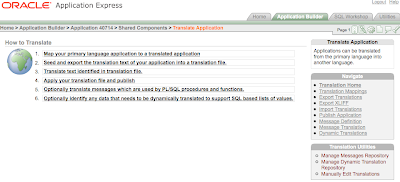
The central region of this page outlines the steps from the beginning to the end of the globalization process and provides the links to the key phases of the process.

Step 1 in this list is a one-off task that needs to be performed only when:
  1. you need to create a new translated application
  2. you need to change an existing mapping or delete it altogether.
Step 2 is the real starting point each time you need to update an existing application when you've changed something that needs to be propagated to the various translations.

Step 3 is a curious fake link. Indeed it's just a reminder of what you need to do next, that is either translate the text yourself or ask someone else to do it for you.

Step 4 takes you to the page where you can see the list of XLIFF files loaded in the repository and you can apply one of them or you upload a freshly translated one.

Step 5 points to the page where you manage the static message translations and is optional. If you don't use translatable text messages, those retrieved via the API call to APEX_LANG.MESSAGE you don't need to go there. Translatable messages are extremely useful for translating static text that needs to be stored inside page items or application items or when the value needs to be returned through a PL/SQL function in the current language. See the linked page for a practical example.

Step 6 leads you to an even more sophisticated feature, the dynamic translation of text returned by dynamic LOVs, that is list of values based on queries. While text descriptions coming from static LOVs are automatically retrieved by Apex and inserted into the repository, this is not possible with dynamic LOVs that are based on user defined queries on arbitrary tables, however Apex gives you the possibility of performing dynamic translations, so, if you have a query like:
SELECT fruit_name d, fruit_id r
FROM fruits
you can get "apple" when viewing the page in English or "Apfel" when viewing it in German.
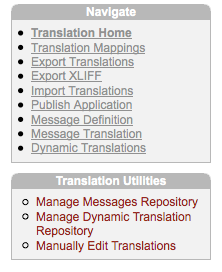

The menu called Navigate on the right hand side is a fine grained list of tasks and gives you instant access to the critical features.

The menu below it, called Translation Utilities, is also important because it's the only place where you find a link to the page for manually translating the text.

For some reason the link to the page that you'll visit most frequently has been named Export Translations, followed by the link Export XLIFF, which is the real page where you actually download a dump of the translation repository.

Why do i need to map an application?
Apex globalization mechanism works by creating a sort of ghost application with its own application ID.
Mapping means assigning a number to a translated application. In an hosted environment like apex.oracle.com, where there are thousands of application IDs already taken by other users, it can be tricky to find out a free application ID because Apex does not automatically suggest the next available number.
Note that Apex doesn't actually reserve the application ID until you publish the translation, so it might happen that you choose an ID but then it's also taken by another user before you had the time to publish the translation.
If that happens, you'll get a run-time error when you attempt to publish (but not at time of seeding):
ORA-20001: Error during execution of wwv_flow_copy: WWV_FLOWS
ORA-00001: unique constraint (FLOWS_030100.WWV_FLOW_FLOW_PK) violated
Each application ID maps to a language code, like it, fr, de, zh-cn, ja and so on.
Apex maintains a consistent session state whenever you switch from one language to another by any means, within the same apex session, which is a good thing.


1. What does it mean to seed an application?
Seeding is the process of preparing a translated version of your primary application.
When you seed the text, Apex inserts/updates/deletes the translation repository with the most recent version of the translatable strings. Seeding alone does not change anything in the currently running translated applications until you publish the translated version.
Note also that when you seed an application you are doing a twofold action: you are not only updating the source text but also the target text. An important thing to bear in mind is that the target text won't be touched only if the old source text and the new source text are equal, (which means that a single space makes a difference!), otherwise it will be "reset". See later on for a typical scenario.


2. What happens when i publish an application?
Publishing is the final step in the globalization process.
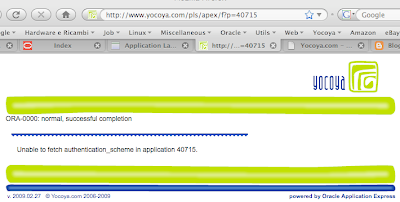
The application is created by assembling the metadata from the primary application and merging it with the translated text. Note that you cannot access directly a translated application by invoking Apex with the mapped application ID, if you attempt to do so, you'll get a page like this:


3. What if i need to update only a few new translated strings?
whenever you add a new element which is a candidate for a translation, like a page item or a new shared component like a list entry, translated applications won't pick them up until you seed the application to the desired language. After seeding the application, the fastest way to get a string translated is to manually edit it. After editing the translation, you can go straight to the publishing phase, without importing anything.
  1. seed the application
  2. click on translation home
  3. click on manually edit translations
  4. update the translations
  5. export the XLIFF file for future reference ( this step is not required but highly recommended!)
  6. publish the selected translation
4. What if i need to update a few existing strings because i changed the corresponding source element?
you must be careful when changing the text of a source element because Apex will automatically wipe out the translation upon seeding! Imagine you have a large text in the source language and you realize there is a grammatical error for instance. This grammatical error is probably absent in the target language(s) so you could easily have a situation where you want to change just the source element, not the existing translations.
So, you fix the source text, seed the application and bang, the old translation is lost!
The target element is erased and replaced with the new untranslated text.
This example demonstrates why you ought to export a full XLIFF file whenever you translate something, the file will be the backup in case something goes wrong.
Back to our problem, if you change a translatable string of an existing element, if you seed the application again, then you need to recover the translation from the XLIFF file, if it still applies, or provide a new one if it does not apply or if you didn't export the XLIFF file. See entry #3 on how to manually edit a translation.

5. What is an XLIFF?
XLIFF is an international file format standard based on XML tailored for translation tools. You can find out more on XLIFF on wikipedia.

6. Do i necessarily need to translate the content of the XLIFF file to translate an application?
No, you don't. You can manually edit the translations after seeding the translation. However, after doing so, you should immediately take an export in XLIFF format as a backup of your work!
The XLIFF format comes in handy if you are going to use some tool to translate the text, otherwise you can easily break the XML file format by deleting or inserting unwanted characters, especially if the translated text contains some HTML tags. There is a free on-line tool kindly provided by iAdvise, that allows you to manipulate XLIFF files generated by Apex.

7. Is there any apex dictionary view containing the translations?
At time of writing (version 3.1.2) there isn't any built-in apex dictionary view available and unless i overlooked it, there isn't any view in the just released version 3.2.

8. Why when i query certain apex dictionary views like apex_application_pages columns like help_text or label are always returned in the primary language?
The apex dictionary view doesn't currently support a language "context", so it always returns the text stored in the primary application, even when the query is originated from a translated application.
Hopefully one day apex dictionary views will fully support translated applications.

9. How can i compare two XLIFF files?
There are some tools around to do this specifically on XML files, besides some powerful plain text editors or Unix and DOS commands.
Some years ago i bought a license of XMLSpy, a powerful Windows based XML editor that comes with a document comparison function. I used it just yesterday to understand why i got two different links in two different application translations. As far as i know you can install a trial of XMLSpy valid for 30 days, so if it is a one-off requirement, it won't cost you a penny. Altova released also a stand-alone utility called diffDog for comparing files, so you might want to check it out as well.
As i am working more and more time on the Mac, today i searched for a file compare utility for Mac OS X and i found what it seems to me like a perfect match, a multiplatform utility called DeltaWalker.
I quickly installed the trial and it worked like a charm although i didn't perform any "stress test". Even in this case you have days ahead to evaluate the product before buying a license.
This was not meant to be a comprehensive software review, so you may want to conduct a deeper search on the web.

10. The Application Language Derived From attribute (in the Globalization Attributes page) contains several options, two of them are called Application Preference and Item Preference: what's the difference between the two?
The former option automatically retrieves the language from a user preference, supposing you have some process that calls the API procedure APEX_UTIL.SET_PREFERENCE. The preference name is called FSP_LANGUAGE_PREFERENCE, a name that may easily lead to some confusion with the other option.
This approach makes sense when the application requires authentication because it stores the value in a sort of user profile. The advantage is in that a returning user doesn't need to switch the language after the login, it will be automatically set by Apex (but he/she can still change it at any time afterwards).
The latter option works by storing the language option inside an application item called FSP_LANGUAGE_PREFERENCE (that you need to create yourself, don't forget it), so the user might have to change it every time if the primary language is not the preferred one. The advantage of this approach is in that it works also with public pages, where you can pick a specific language by clicking on an icon or selecting from a list. The logic for updating the application item must be written by the developer.

11. Is there any way to set a given language from the URL?
This problem has haunted me for quite some time.
The solution i found works well with real users but doesn't work well with web spiders like googlebot who is very picky with web redirects.
First of all you need to set the globalization attribute "Application Language Derived From" to "Item Preference (use item containing preference)".
Secondly you must set up an application process that runs before header performing a conditional redirect using the following PL/SQL call:
begin
:FSP_LANGUAGE_PREFERENCE := :REQUEST;
htp.init;
owa_util.redirect_url('f?p='||:APP_ID||':'||:APP_PAGE_ID||':'||:APP_SESSION);
end;
and the condition is "Request is contained within Expression1", where expression1 contains the list of the expected language codes like "en,de,fr,..." as shown in this sample page:

http://apex.oracle.com/pls/otn/f?p=multilangdemo:1:0:en
http://apex.oracle.com/pls/otn/f?p=multilangdemo:1:0:es

As i stated initially, redirecting the page may adversely affect the page indexing process, for instance Google spiders don't like at all redirects and this may prevent the link from being harvested. This is not a problem if the application is not aimed to the public and you don't expect users to reach you through a web search.

Note that setting the item FSP_LANGUAGE_PREFERENCE directly from the browser achieves curious results owing to the sequence of operations that Apex does when building a page. If you set this application item from an URL, apex will start building the page using the current language, then, at a certain point it will set the new value for the variable in the session state. This may result in pages with mixed languages, where static text is still in the old language and dynamic content is in the new language. If you reload the page though, the new language will be used. This is clearly a suboptimal solution.
There must be a reason if the Apex team decided to retrieve the current page language before setting values in session state, if not, may be one day we will be able to change the current language before the page loads without the need for an additional redirect.
Updated on march 13:
i simplified the argument in the call to OWA_UTIL.REDIRECT_URL, instead of using an absolute path, now i'm using a relative path, which makes the transition from a development or test environment to a production environment much easier because there is no need to worry about the current service path.

12. How to show the current page in a different language by pressing a button?
With a logic similar to that i explained in question #11, but replacing the redirect process with an application computation that updates the value of FSP_LANGUAGE_PREFERENCE after submitting the page, you can switch language in every page of your application by clicking on a button defined as illustrated below:
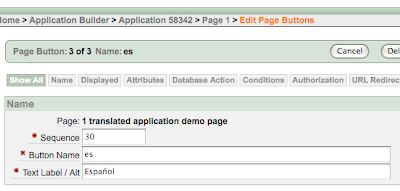
The second component is a simple conditional after submit application computation (a computation that will automatically run on each and every page if a condition is met) defined as follows:
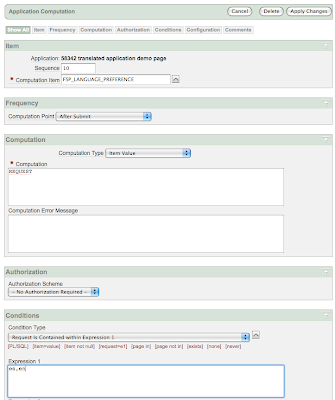

With just a few components like a region of buttons (or icons or whatever you prefer) defined on page zero and a single application computation, you can easily enable language switching on each page. If you prefer you can move this function to the navigation bar, where you can define each entry as an URL containing a javascript call like "javascript:doSubmit('es');".
See how it works in a live demo application.

More infrequently asked questions to be added in the future.


See more articles about Oracle Application Express or download tools and utilities.

Tuesday, March 27, 2007

Oracle APEX Globalization Tips for sleeping well

Yesterday it was my G-day: alea iacta est!

I finally decided to go global with a tiny application i am developing and i embarked myself on the translation mission.

I was really eager to start investigating the built-in translation facilities of Oracle Application Express as i felt that:
  1. There was a huge gap in the knowledge of this area on my side.
  2. I had the impression that this was one of the strongest points of Apex: a robust, flexible and powerful mechanism for delivering a localized application in almost every aspect.

Funnily enough, both facts proved to be true, at my expense.

I set out and took this application in its current development status and, following the recipe in the on-line help, i created a mapped english version.
Then i started playing aroung with XLIFF files, exporting, importing, checking and unchecking options in order to understand how the process works.
I just didn't realize exactly what Oracle meant by seeding an application.
Or better said, i didn't understand early enough the implications of seeding.

I thought it was just a way of freezing the value of labels, titles and so on, but actually it was much more than that.
One must understand that, if a dedicated application ID is required to handle each translated version, that means a lot more than just translated labels.

So, after a while i left this globalization exercise and went back to develop my application.
Strange things began to happen.
I must say, begging for pity, that yesterday i was tired, my back was in pain, the night before i went to sleep very late and woke up very early, there was a flood, the grasshoppers...
IT WASN'T MY FAULT!

Anyway, i was modifying some processes in a page and when i went out to try them, either they didn't work as expected or they did something weird. Values disappearing without explanation. Processes that didn't fire. Checkpoints ignored.

I was really upset.

The fact is i had completely overlooked my previous globalization experiments.

Finally, for some reason, i took the decision that saved my night or what remained of it.

I changed the request string of a button. I don't even know why i did that, i was almost desperate, i had rewritten code, attempting to raise errors that got never fired, i was to the point to give up!

Then i went to test this final change, sort of Armageddon, to see what the hell was happening with my program, and to my big astonishment, the button was still carrying the old request.

There was a light at the end of this tunnel.

Eventually i realized that i was testing the page with a "wrong" language setting, diverting me to the translated, globalized, yet dramatically old version of the code.

As i translated only the first page and the others were still carrying the original untranslated text, i could not spot the difference between the new and the old one, moreover i hadn't change any items or layout thing, i had just been working on processes, so it looked the same, but it wasn't doing the same!

I changed the browser's language setting to match the application's primary language and everything was starting to work normally again. EUREKA!

Moral, here are my commandments:
  1. Go to bed on time.
  2. Translate an application when it's finished, not when you are still muddling the whole thing.
  3. Make translated labels look different. Do something, translate them or just put a reminder, insert something that let's you understand at once that what you see is not the original primary application's text.
  4. Set the primary language in the browser such that it matches the primary language of the application, so you don't get diverted to a translated version unless you explicitly want to test that particular version.
In case you prefer to breach my commandments, remember to seed the application for each translated version you've mapped to your primary application's language every time you make substantial changes.
Seeding will keep all application versions in sync, recycling translated attributes, purging what's no longer there and adding new entries.

But in the end i am really amazed by how simple and quick is to create a translated version of an application, even if i was almost to the point of throwing my laptop out of the window.


Happy globalization!

yes you can!

Two great ways to help us out with a minimal effort. Click on the Google Plus +1 button above or...
We appreciate your support!

latest articles